Premier Services
Transform Every HVAC Call into Profitable Performance
Everything you need to transform your HVAC business, for one predictable monthly price.
Benefits of Premier Services
40-60%
Increased avg. revenue / ticket
30-50%
Reduced callbacks
80-90%
Increased avg. ticket size
10-20x
Average Annual ROI
Reviews
What HVAC Pros like you are saying about measureQuick
“Everyone at measureQuick us very helpful when you are in need”
The thing I like best about this company is everyone is very helpful to one another when you need, they will not hesitate to give a fellow employee a hand management shows appreciation and they are easy to talk to the doors are always open if you are in need of anything.
“We are really big on measureQuick right now”

Perfect tool to take ourselves to the next level

We got into measureQuick through Jim Bergman who knew that we were always looking to better our company, give a better experience to our customers. Once measureQuick was developed, it was just a perfect tool for us to really take ourselves to the next level.
Read more “Perfect tool to take ourselves to the next level”
Companies not using measureQuick just aren’t giving that level of service

We can get multiple eyes on a problem and that really reduces the need to have to come back for a second diagnosis […] We’re showing [customers] a full report of how their system’s working and they’re going to get a better understanding of what problems are, what we can do to fix them. Companies that aren’t taking advantage of measureQuick just aren’t giving that level of service.
Read more “Companies not using measureQuick just aren’t giving that level of service”
“measureQuick is indispensable to me”

There are very few companies I admire as much as the team at MeasureQuick, because I know this is so much more than just a paycheque for them. They really care about making the HVAC industry a better place, and it shows.
“I feel like it’s Jim Bergman‘s brain, downloaded into the code”

Read more ““I feel like it’s Jim Bergman‘s brain, downloaded into the code””
“Few times in life do you get a win-win opportunity such as this”

We used to scramble making purchases for branded merchandise with our co-op dollars that provided little value to our customers and our business. When I learned that I could purchase the the Digital TrueFlow Grid with our co-op dollars because of its branded customer report feature, I immediately acquired more for our team which allowed us to become more transparent with showing our value to clients. Few times in life do you get a win-win opportunity such as this!
Read more ““Few times in life do you get a win-win opportunity such as this””
“We use measureQuick in all of our businesses”

Faster remote assistance & better accuracy with mQ livestream

Read more “Faster remote assistance & better accuracy with mQ livestream”
“If you’re not using measureQuick, you’re leaving money on the table.”

I had just started HVAC at this new company and we didn’t have a lot of guys yet. We had four guys, including myself. As we were hiring more and more guys in, we were trying to figure out what gauges & tools we were going to use. I was asking one of our best guys at the time “what do you like?”
And he says it really doesn’t matter – I can use Testo or FieldPiece or whatever, cause I use measureQuick. You can use any brand tool you want and it converts everything into the app. And I’m like, man, that sounds pretty cool. So I downloaded it myself and I was still out running calls at the time, and I tested measureQuick out in the field. And I was like, Holy crap, this is awesome. It’s super easy to use and I can use any tool I want.
A lot of times the hardest part about HVAC is that communication piece and the reporting that is generated from measureQuick with a grade, a letter grade. Everybody understands that. So if a technician is showing a customer that their system is performing at a D minus. The customer understands exactly what that means, and from a third party. It’s really a great way to show the customer kind of the deficiencies in the system. And then what’s also awesome is after you show the customer that D minus and what it would take to get it up to an A, it’s awesome when you’re able to do that and you do your clean the coil and make whatever repairs were necessary, get the airflow correct.
And all of a sudden you’re back to an A, so now that customer is a customer for life and they’re going to, they’re going to tell you, tell your neighbors about your company. So that’s really a powerful tool. It’s a marketing tool – a business tool really.
Read more ““If you’re not using measureQuick, you’re leaving money on the table.””
“measureQuick allows training to be tailored to specific topics”

The ability to unify and communicate with the awesome selection of connected tools that are available on the market today is one of the pieces that has been most important to myself. The integrations allow me to only have to familiarize myself with the intricacies of the MeasureQuick platform instead of fumbling around with the tool manufacturer’s software (which to be honest is generally not what they’re good at, they’re good at making tools).
As a business owner it is often hard to know what areas your staff may need more training in. Since I am also in the field the majority of the time, looking back at past measureQuick reports allows me to see what “flags” are being repeatedly ignored / overlooked and allows training to be tailored to the specific topics that seem most important to the way I want my business to operate.
Over the years the power of the software has grown, now with the integration into House Call Pro (the CRM software that we use), integrations with the TrueFlow Grid for airflow measurements, and the Sauermann combustion analyzers means that all of our workflows, from the day of an install to the years of maintenance thereafter, can be ran inside of the MeasureQuick platform and sync with our customer history.
For my business, I can trust that my technicians are following a proper workflow / protocol. We used to have massive checklists for our maintenance members because I always wanted to offer a streamlined / similar experience, no matter the technician that was at my customers home that day. MeasureQuick allowed us to consolidate that into an application that not only gathers the metrics needed, but also can help point less seasoned technicians to problems they may have glossed over, as well as provide a beautiful report that proves the measurements that we took while on site.
Read more ““measureQuick allows training to be tailored to specific topics””
“Once we’ve started using measureQuick, we’ve noticed our callbacks have dropped dramatically”

Callbacks used to be a pretty just accepted part of our company, to the point where we even had a full time guy that was hired just to run callbacks. That’s not really sustainable if you’re paying people and then as you continue to scale. If we have 1 guy running warranties, that’s basically at a net loss for the company for it. For every 25-30 technicians, we now have to hire another warranty guy at a loss just to go behind these technicians.
Over the last year, we haven’t seen any callbacks from more recent things to the point where we actually were able to just eliminate that position because we’ve been able to effectively reduce our callbacks in a significant amount. And we’ve noticed, a lot of our callbacks before were a lot more just on simple things. We’d get the information back and we’d just be like, oh, gas pressure was set to wrong systems now overheating or band speed wasn’t separate systems overheating or not cooling. So now the coils nice enough after their visit. Left the door panel off the AC, or, just minor things that add up, but then really take no extra time to go and go and solve. But once we’ve started using measureQuick, we’ve noticed our callbacks have dropped dramatically when it comes to the craftsmanship side of things. So now we run almost 10 manufacturing warranty. So legitimate warranties for every. One kind of craftsmanship issue, whereas before it was about 50 50 split.
The Remote Streaming Feature is something that I have found invaluable, the before I used to have to get in a vehicle or my field managers get in a vehicle or teams, technical captains would have to get a vehicle and go up to a technician. To figure out what’s going on, because. Very few people can see pictures or just get a list of, hey, my temperature is at this and this and be able to fully diagnose it without being there and seeing it. Now we can see exactly where the temperatures are at, where, where the electrical voltage and currents are at and just see how the overall systems are forming at the same time we’re able to see the flags. And. Even just with that, I’m able to jump in there quick or captains or technical support.
We also use ServiceTitan, so the office staff watching the calls, will get notified “Hey, mQ is complete!” They know they’re on deck and should start helping build options, looking through the photos, all that kind of stuff. But it has also helped our customer service team on the back end, people call back with questions from the customers. Our support staff can see exactly what happened on site, and help our customers more on the front end versus, hey, let me get the answer for you and call back. So now we’re able to provide that just a little bit better customer service.
The more we get into it, and in the years to come, as we refine our processes, our measureQuick use is just going to keep growing and growing.
What’s New in Premier Services
measureQuick 3.6 delivers System View, a redesigned field interface, AI-powered diagnostics, video documentation, custom checklists, and more. Every feature below is exclusive to Premier Services.

mQ+ Interface: Built for the Field
mQ+ puts your most-used tools within thumb reach. The bottom navigation drawer gives you one-tap access to the flashlight, camera, microphone, AI Assist, and toolbox. No menus to drill through while standing at a condenser.
- Bottom navigation drawer with flashlight, camera, mic, AI, and toolbox
- Interface Chooser lets you switch between mQ Classic and mQ+ anytime
- Streamlined workflow reduces screen taps per diagnostic
- Designed around one-handed field operation
System View: See the Thermal Cycle in Real Time
System View is a real-time, interactive diagram of the HVAC system under test. It displays live pressures, temperatures, superheat, subcooling, airflow, and dehumidification readings directly on a system schematic. Refrigerant levels in the condenser and evaporator update dynamically. Tap any component to see detailed measurements. Switch between full system view and refrigeration-only view, and adjust text sizing for visibility in any field environment.
- Patent-pending interactive thermal cycle visualization
- Live data from every connected instrument, overlaid on a system diagram
- Full-screen mode for walkthroughs with homeowners
- Available in all cooling and heating workflows

AI Assist: Your Diagnostic Partner
Your newest technician is standing at a unit with 22-degree superheat on a TXV system. Is that a problem? What should they check next? AI Assist answers diagnostic questions by voice or text, using the current system profile and live readings. No Google searching. No calling the office.
- Voice and text conversation, built for field conditions
- Answers draw from your current system profile and live readings
- Field-first AI, not a summary generator
- Accessible from the mQ+ navigation drawer or any active test

Checklists: Your Process, Enforced
Define the exact steps your technicians follow on every call. Companywide Checklists let you require photos, videos, or specific measurements at any point in the workflow. Position them before the diagnostic, during installation, or after the repair. Your process runs the same whether the tech has 20 years or 20 days.
- Admin-configured checklists deployed to every technician automatically
- Require photo or video documentation at specific steps
- Position checklists at any point in the diagnostic workflow
- Consistency at scale, from a 3-person crew to a 50-tech fleet

Video Documentation: Show, Don’t Tell
A photo shows what a system looks like. A video shows what you found and what you did about it. Capture 30-second clips during service calls, and every customer report includes a QR code that links directly to the video. Homeowners see the corroded contactor, the frozen coil, the ductwork gap. Proof of work that builds trust and closes service agreements.
- 30-second clips captured during the service call
- QR codes in customer reports link directly to video
- Backs up to the cloud automatically
- Reduces “he said, she said” disputes on callbacks

Quick Profiles: One Tap to Profile
Your company installs the same 8-10 equipment configurations on 80% of jobs. Quick Profiles let you save those configurations as company-level templates. One tap in the field applies the correct manufacturer, model, tonnage, refrigerant, and metering device. Less manual data entry, fewer transcription errors, and faster time to first reading.
- Company-level equipment templates managed by the admin
- One-tap equipment profiling in the field
- Manufacturer, model, tonnage, refrigerant, and metering device pre-filled
- New technicians profile equipment accurately from day one

Tool Tracker: Know Where Every Tool Is
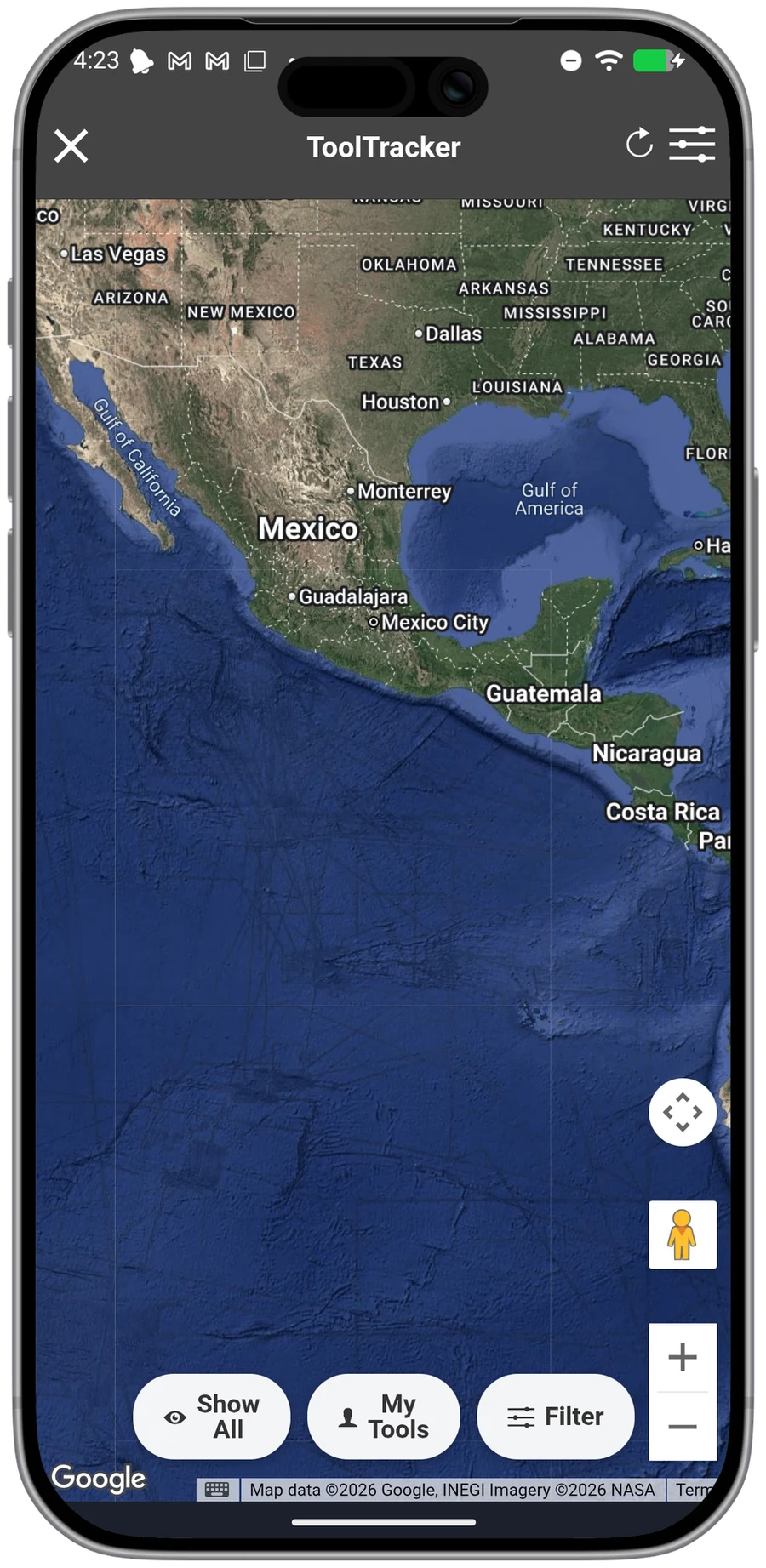
A lost manifold costs $400-800 to replace, plus the lost productivity while the tech borrows or waits. Tool Tracker records GPS location history for every connected Bluetooth instrument. Open the map view and see where each tool was last connected. When a manifold gets left at a job site, you know which site before the customer calls.
- GPS location history with map view
- See where every instrument was last connected
- Works with all 50+ supported Bluetooth tool brands
- Reduces lost instrument replacement costs
Documentation-Only Mode
Not every job needs a full diagnostic. Documentation-Only Mode lets your team capture photos, videos, and notes without starting a test. Use it for installation walk-throughs, warranty documentation, or site assessments. The documentation stays attached to the project and syncs to the cloud.
Standalone Mode
Some diagnostics happen off the clock. Standalone Mode lets you run a full test without creating a project first. Quick rooftop checks, training runs, or troubleshooting before you know the scope. When you are ready to formalize the work, convert it to a project. Available in mQ+ only.
Everything Your Team Already Counts On
Premier Services also includes the features that HVAC teams already depend on every day.

AI System Profiler
- Instant equipment recognition from photos
- Automatic data population
- Reduced manual entry errors

Expert PDF Reports
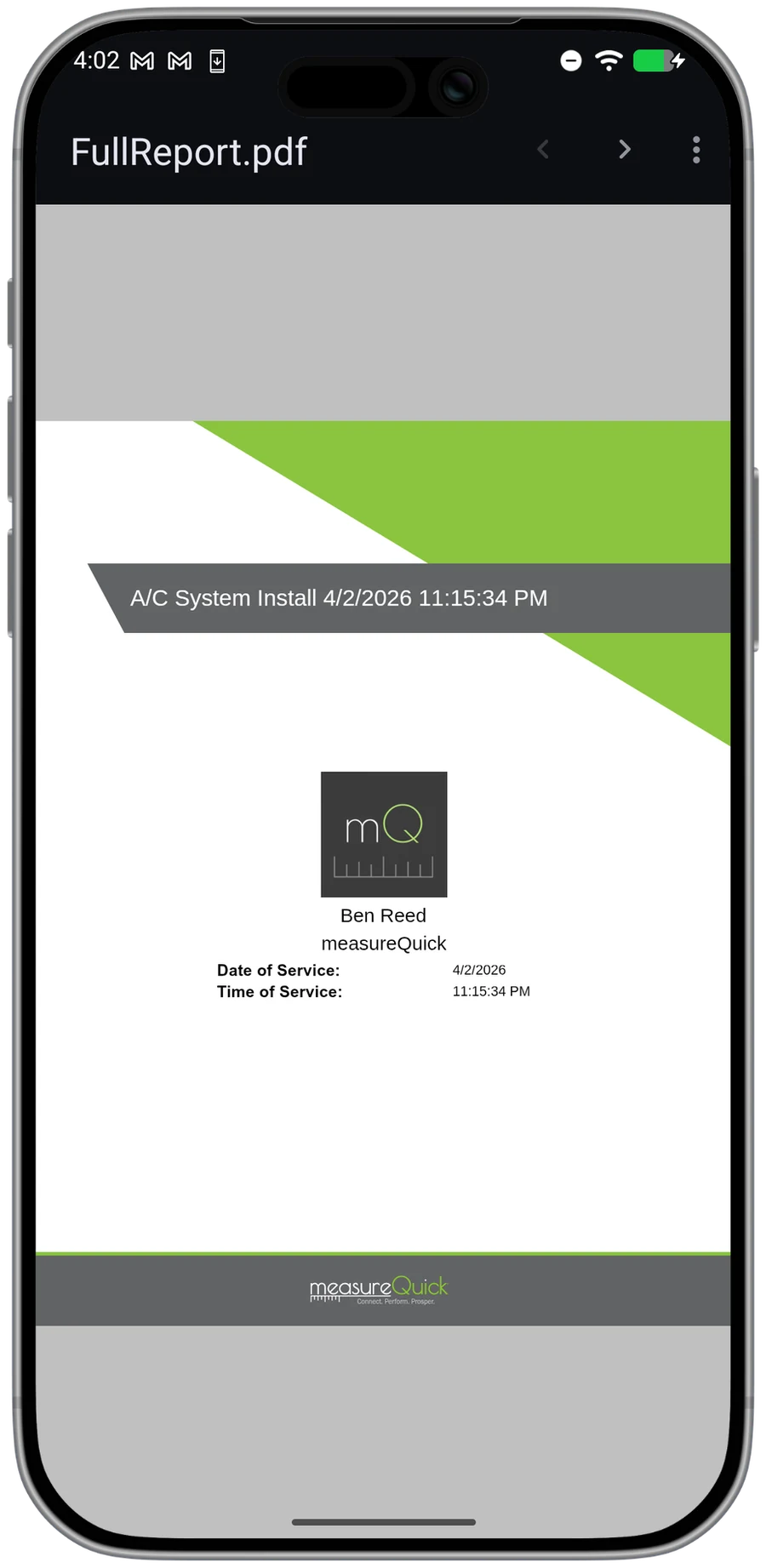
- System Vitals score on every report
- Before/after comparisons
- Branded PDF exports for homeowners

TestTracker
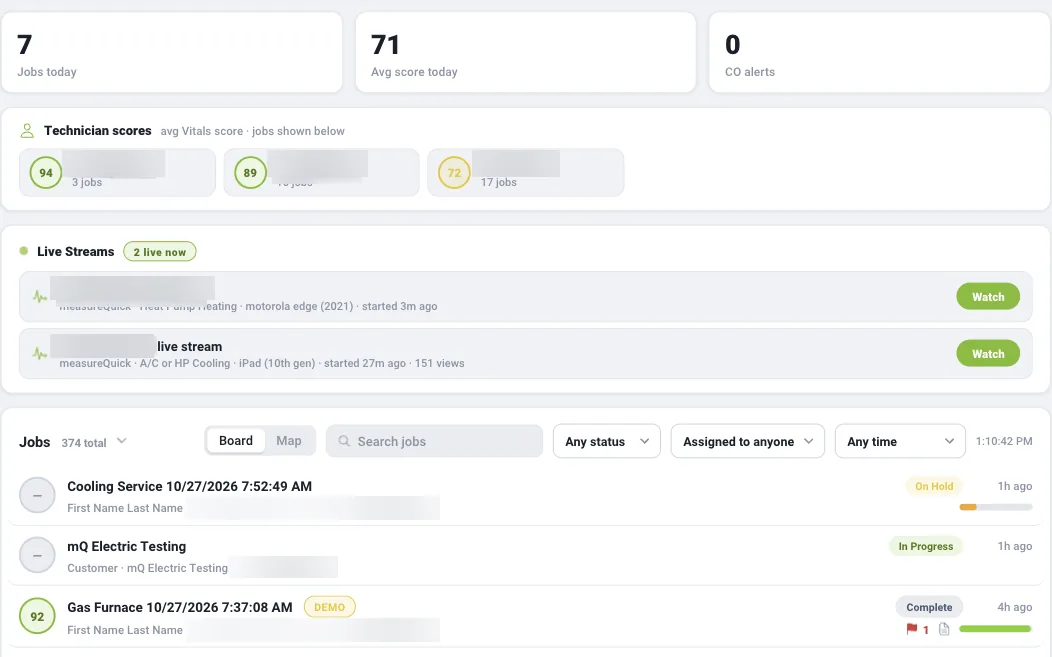
- Live diagnostic streaming to the office
- Real-time guidance from senior techs
- Increased first-call resolution rates

CRM Integrations
- ServiceTitan and Housecall Pro
- Automated project and data sync
- No double entry between platforms

Unlimited Photos
- Document every job with photos
- Automatic cloud backup
- Include in customer reports

Cloud and Unlimited Projects
- Settings sync across every device
- Team management and project history
- Return to any job site virtually
Stop leaving money on the table.
measureQuick’s Premier Services help your team identify opportunities and close more sales by providing clear, data-driven recommendations that homeowners trust.
Real Results from Real Contractors
See how HVAC companies use measureQuick to cut callbacks, accelerate training, and grow revenue.
0.5%
Callback rate
Air Doctors Dropped callbacks from 3-4% to 0.5% with mandatory measureQuick on every call.
75%
Quality-tier close rate
Ray O. Cook Recovers 30% of lost performance and wins 75% of quality-tier sales.
3x
Revenue multiplier
Honest Heating Went from a 1.8x multiplier to 3x plus $1,500 truck rolls.