
Pull the report from your desk.
The office runs on records, and too often the record is stuck in the field. measureQuick syncs every diagnostic to the cloud and attaches the finished commissioning report to the work order automatically, so dispatch and admin pull what they need from the desk while the truck stays on the next job. The job documents itself, and nobody re-keys field numbers by hand.
The problem
The work is done. Getting the paperwork should not be the hard part.
- Chasing technicians for documentation that should already be in hand
- Reports that arrive days late or do not match the work order
- No way to see where a job stands without calling the truck
- Re-keying diagnostics from the field into the CRM by hand
- A warranty or compliance request that sends everyone digging for records
What you get
Reports attach themselves
The commissioning report lands on the work order automatically. Pull the finished record from your desk the moment the diagnostic finishes.
The whole board, from your desk
The cloud portal shows recent projects as completed, in progress, or flagged for a failed result, plus completion rates and trends. The office knows where every job stands without picking up the phone.
Dispatch in sync
measureQuick connects to the CRM you run, ServiceTitan, Housecall Pro, Jobber, or Fieldstone, so job details come in and completed reports go back to the job with no double-entry.
The record answers the warranty desk
Complete system history, measurements, and photos live in the cloud, so a warranty or compliance request is answered from the desk. At Ray O. Cook, a warranty call from 40 miles out took five minutes where it once meant a multi-trip investigation, because the readings were already on file.
A safety record that logs itself
When a CO event happens on a job, measureQuick snapshots the reading, the threshold, and the timestamp to the cloud automatically. The office holds a documented CO exposure record without anyone stopping to write it down.
Instruments accounted for
Tool Tracker keeps the company's probes tied to trucks and technicians, so the assets the office manages stay accounted for.
Questions, answered
How does the report get onto the work order?
Automatically. When the tech finishes the diagnostic, the commissioning report attaches to the job, so the office pulls the finished record from the desk while the truck stays on the next call.
Which CRMs does it sync with?
ServiceTitan, Housecall Pro, Jobber, and Fieldstone. Job details come in and completed reports go back to the job, so nobody re-keys field numbers by hand. With Jobber, photos, PDF reports and ACCA QI certificates attach to the job, and measurement data stays in measureQuick.
Can we see a job status without calling the tech?
Yes. Job status and the finished documentation live in the cloud, so dispatch and admin see where every job stands from the office.
Who keeps track of the company instruments?
Tool Tracker ties each probe to a truck and a technician and logs a location every time an instrument connects, so the assets the office manages stay accounted for.
Does the office have to wait on a tech with signal?
No. Tests run in standalone mode without cellular or WiFi and sync to the cloud the moment the tech is back in range, so the record reaches the office without waiting on a bar of service.
How does the office handle a warranty or safety record?
The cloud holds the complete job history, measurements, and photos, and CO events snapshot their reading, threshold, and timestamp automatically. A warranty claim or a compliance request is answered from the record on file, ready before anyone asks.
See the report that files itself
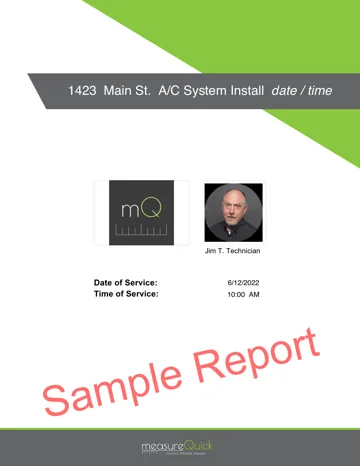
This is the document that lands on the work order: scored results, photos, and findings in plain language. Download a sample and read what the office pulls from the desk.
Get the office out of the chase.
Real-time diagnostics on 80+ tools across 17+ brands are free forever. Premier is $49 per user per month.