
measureQuick v3.6: From Measurement to Verified Execution
measureQuick v3.6 is the largest release in the platform's history.
A redesigned interface, measurement-aware AI, patent-pending system visualization, companywide checklists, and GPS tool tracking, all built around one principle: closing the gap between what technicians know and what gets documented, verified, and acted on in the field.
Starting in v3.6, you can start using the app with your smart tools without an account and without manual data entry.
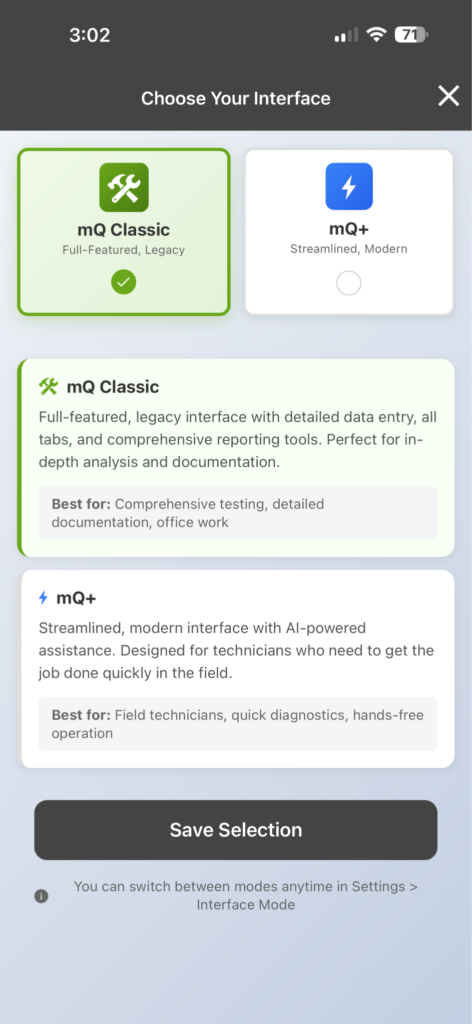
mQ+: A New Interface Built for Speed in the Field
Premier Services subscribers now have access to mQ+, a completely rebuilt interface designed around how technicians actually work. The app detects connected Bluetooth probes automatically, pre-fills known equipment profiles, and tracks progress through a percentage indicator.
mQ+ features a five-tab bottom navigation (Home, Grid, Gauges, System, Toolbox), a quick-access drawer with flashlight, camera, and actions, and voice-enabled AI interaction. Subscribers can switch between mQ+ and mQ Classic at any time in Settings; both interfaces share the same data and projects.
System View: Patent-Pending Interactive Visualization
System View is a real-time, interactive diagram of the HVAC system under test. It displays live pressures, temperatures, superheat, subcooling, airflow, and dehumidification readings directly on a system schematic. Refrigerant levels in the condenser and evaporator update dynamically. Every element is interactive: tap the condensate line for dehumidification data, tap the filter for face velocity ranges, tap the liquid line for temperature readings.
"Being able to take numbers and turn them into a visualization of the data where you can actually see the superheat or the sub cooling changing, or you can see the refrigerant moving from one side of the system to the other, is such a powerful feature," says Jim. "Visualization of data allows people to actually understand what's going on at a much deeper level, because they can let the software do the calculations so that they can actually see the relationships."
The diagram responds to profile changes in real time. Switch the metering device from piston to TXV, and the display updates to show the TXV bulb, external equalizer line, and the resulting change in evaporator charge state. Technicians can toggle between full system view and refrigeration-only view, and adjust text sizing for visibility in any field environment.
System View is included with Premier Services ($49/user/month).
Companywide Checklists
Company administrators can now build custom checklists that deploy to every technician in the organization. Each checklist is tied to specific workflow types (cooling vitals, cooling service, gas furnace, installation) and can be positioned at the beginning, before measurements, after measurements, or end of the workflow.
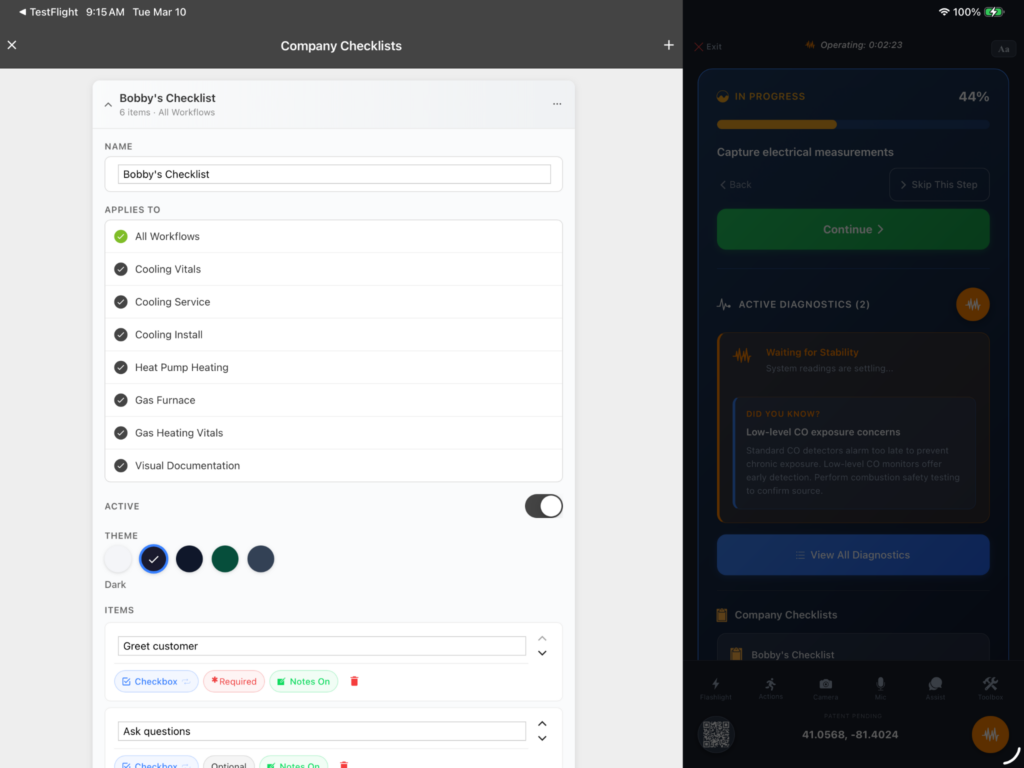
Checklist items support checkboxes, photo capture, and video clips up to 30 seconds with annotations. Videos embed into reports as QR codes, so customers or managers scan the code and watch the field recording from measureQuick's cloud. Default checklists ship with the app covering mechanical inspection, photo documentation, and work completion. Companies can modify these or build from scratch.
Custom Checklists are available to Premier Services subscribers.
Introducing Tool Tracker
"The coolest feature that I hope you never need."
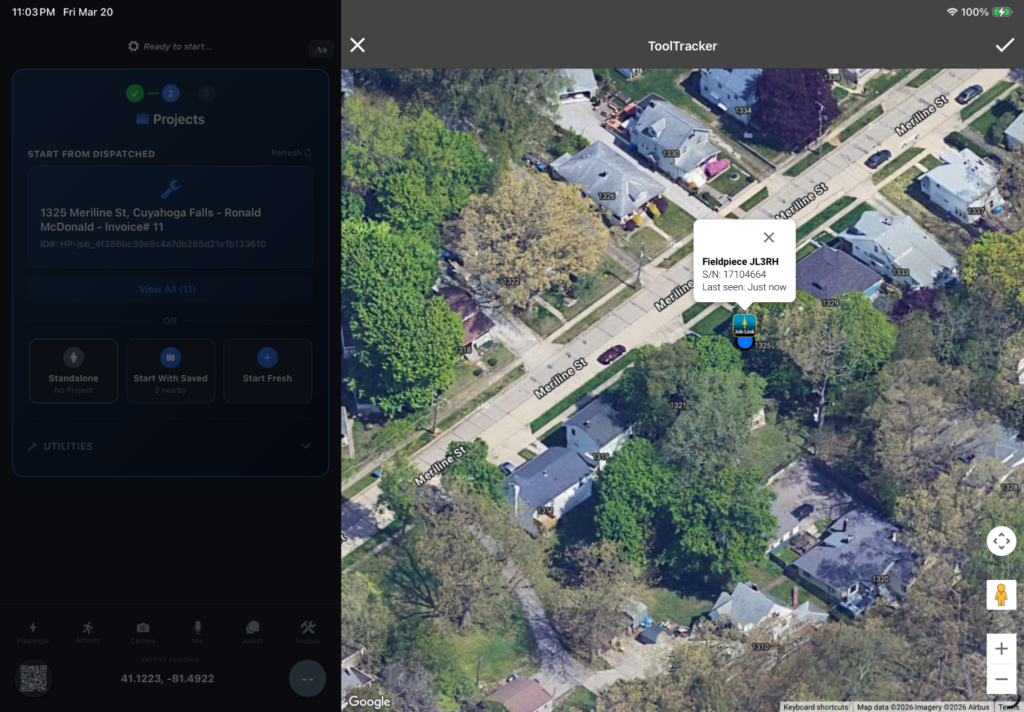
Tool Tracker records the GPS coordinates of every Bluetooth tool each time it connects during a job. The result is a map view showing the last-known location of every tool in a technician's kit, with make, model, serial number, last user, and last-seen timestamp. Tap any tool on the map and the app pulls up the street address.
Tool Tracker is available to Premier Services subscribers.
Quick Profiles and Smarter System Profiling
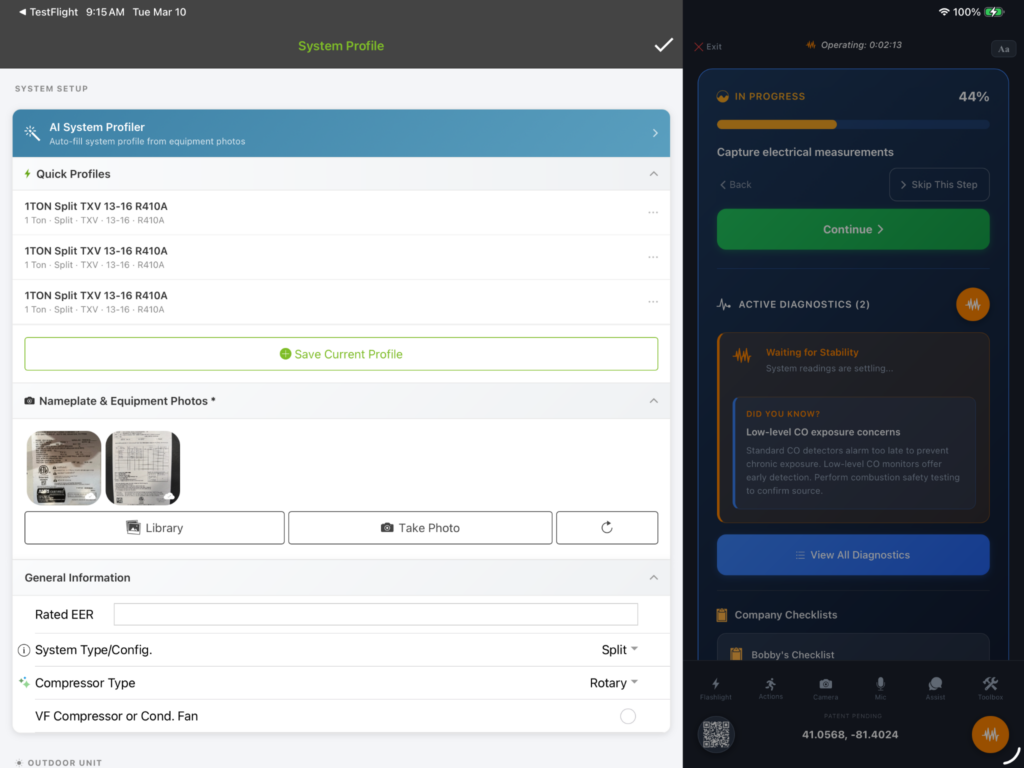
The AI System Profiler now extracts more data from equipment nameplate photos, including improved heating and cooling data, automatic fuel type detection, gas furnace rating plate capture, and automatic access to equipment manuals. Quick Profiles let companies save common equipment configurations as reusable templates. Technicians select the profile at the job site, and tonnage, refrigerant type, nominal airflow, and metering device pre-fill automatically.
System Profile updates are available to Premier Services subscribers.
AI Diagnostics Grounded in Real Measurements
Typical AI tools in HVAC generate recommendations from text prompts. measureQuick's AI reads live system measurements directly from connected probes, analyzes the data against the equipment profile, and delivers structured diagnostic summaries without the technician entering a single number manually.
When a project reaches stability, the AI generates a summary with prioritized findings, specific recommendations, and a plain-language explanation for homeowners, in any language. It identifies conditions like low evaporator load, potential loose TXV bulbs, or airflow restrictions, and explains both the cause and the next verification step.
AI Assist operates as a floating action button within the mQ+ interface, accepting voice or text input and responding using live measurement data. It also knows when to leave a system alone. In mild weather or low-load conditions, the AI validates performance against actual operating conditions and indicates when no meaningful improvement can be made, preventing unnecessary adjustments during shoulder-season service calls.
Tool Ecosystem Updates
Version 3.6 adds new support for the UEi HAC wireless clamp meter and Testo 558s/570s digital manifolds (beta).
Existing integrations for NAVAC NX1, JB Climate Class, Seitron, and Sauermann receive firmware updates, improved connectivity, and bug fixes, including a fix for Android users scanning the Seitron manifold. measureQuick now works with 80+ smart tools across Fieldpiece, Accutools, Testo, UEi, NAVAC, JB, Sauermann, Seitron, and more.
Additional Improvements
- SSO Login: Sign in with Google, Apple, Facebook, or Microsoft.
- Multi-Account Mode: Switch between personal and company accounts with a single tap.
- Photo and Video Documentation Mode: Capture job site photos and 30-second video clips without running a full diagnostic. Videos embed into reports as QR codes. (Premier)
- Gas Heating Workflow: Reworked with built-in fuel type selection, auto-populated manifold pressures, stability-based diagnostics, updated Vitals scoring, and high-altitude adjustments.
- Standalone Mode: Full diagnostic functionality without creating a project.
- Dark Mode, Light Mode, and Adjustable Text Sizing: Full theme support for visibility in any field environment.
- Persistent Settings and Toolbox: App settings and tool configurations sync across devices when logged in.
- Streamlined Profile Page: Equipment profile entry reorganized for faster data input.
- Refrigerant Defaults: The app remembers the last-used refrigerant type.
- Reworked Onboarding: Guided setup and permissions for faster first-day productivity.
- Hundreds of Bug Fixes: Performance, stability, and responsiveness improvements throughout the app.
Premier Services
measureQuick has two tiers: a free tier with core diagnostic features and workflows, and Premier at $49 per user per month. New Premier features in v3.6: mQ+, System View, Tool Tracker, Quick Profiles, companywide checklists, and photo/video documentation mode. ACCA QI and NCI certification programs are available as add-on options.
SSO login, standalone mode, dark/light mode, and all core diagnostic workflows are available to all users at no cost.
Getting Started
Update measureQuick to v3.6 from the App Store or Google Play. Premier subscribers will see the option to switch to mQ+ after login. Existing projects, profiles, and tool configurations carry over automatically.
For detailed feature walkthroughs, visit the measureQuick Knowledge Base. Full release notes: measureQuick Version 3.6 Release Notes.