
Measured airflow, point by point.
The Duct Airflow Traverse is a quick test for Premier Services. measureQuick lays out the measurement points, paces you through them with audio cues, and calculates airflow, with results on their own report page.
Why a traverse
PremierAirflow is the number the rest of a diagnosis leans on. Delivered capacity is calculated from it, and a charge diagnosis depends on it. It is also one of the harder numbers to get in a house.
Air doesn't move through a duct at one speed, so one reading in the center is an estimate. A traverse samples a grid of points and averages them. The Duct Airflow Traverse, a quick test for Premier Services, runs that process for you. In Jim's demo, the full 25-point traverse took about two minutes.
How it works
The quick test handles the parts that are hard to do by hand. Start it from Quick Tests, or from the indoor airflow measurements. In mQ+, cooling workflows include a Duct Traverse step, so measured airflow is part of the workflow, and the traverse also runs in Test Mode with a full-screen 3D view.
- Step 1
It sets up for your tool
With a supported tool connected, measureQuick sets up the traverse to match: an in-duct hot-wire traverse, a grille face-velocity traverse, or an in-duct pitot tube traverse.
- Step 2
It lays out the grid
Enter the duct width and depth, or capture them with the camera where supported. Tap Generate Traverse, and the app shows where each access hole goes and how deep to insert the probe at each point, using the Chebyshev method.
- Step 3
It paces you with audio
A countdown starts each hole, and a beep tells you when to move to the next point. You watch the probe, not the screen.
- Step 4
It reads longer where the air is turbulent
Some points take longer because the app keeps sampling until it has a better average.
- Step 5
It corrects for air density
Temperature and humidity readings feed the correction, and the result is reported in both actual and standard CFM.
- Step 6
It waits for you
There is no time limit between holes. Take the phone call, then pick up where you stopped.
See where the air moves
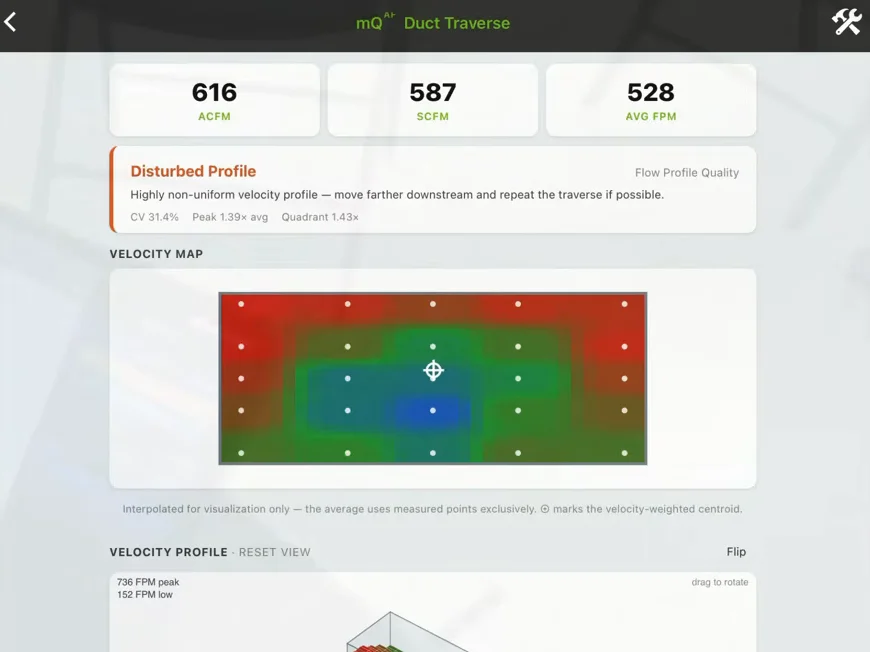
Tap Finish and Calculate, and measureQuick shows the airflow with a heat map of the readings and a surface plot of the velocity profile. You see where the air is moving fast, where it is slow, and where the average sits. If the profile is highly disturbed, the app says so and suggests measuring further down the duct.
Traverse results print on their own report page, with actual and standard CFM, average velocity, duct size, the heat map and velocity profile, the velocity and number of readings at each point, and the density correction.
"This really will tell us a lot more than a static pressure reading ever can or a single reading off a capture hood, 'cause there's a lot of information hidden in all these points."
Two reference checks
The series opens with the two measurements a traverse gets checked against: a capture hood reading and total external static pressure.
Read CFM at the grille
The Testo 420 capture hood reads CFM directly at the grille. Seal the hood against the surface, and take more than one reading to confirm they repeat.
Check the range on the fan table
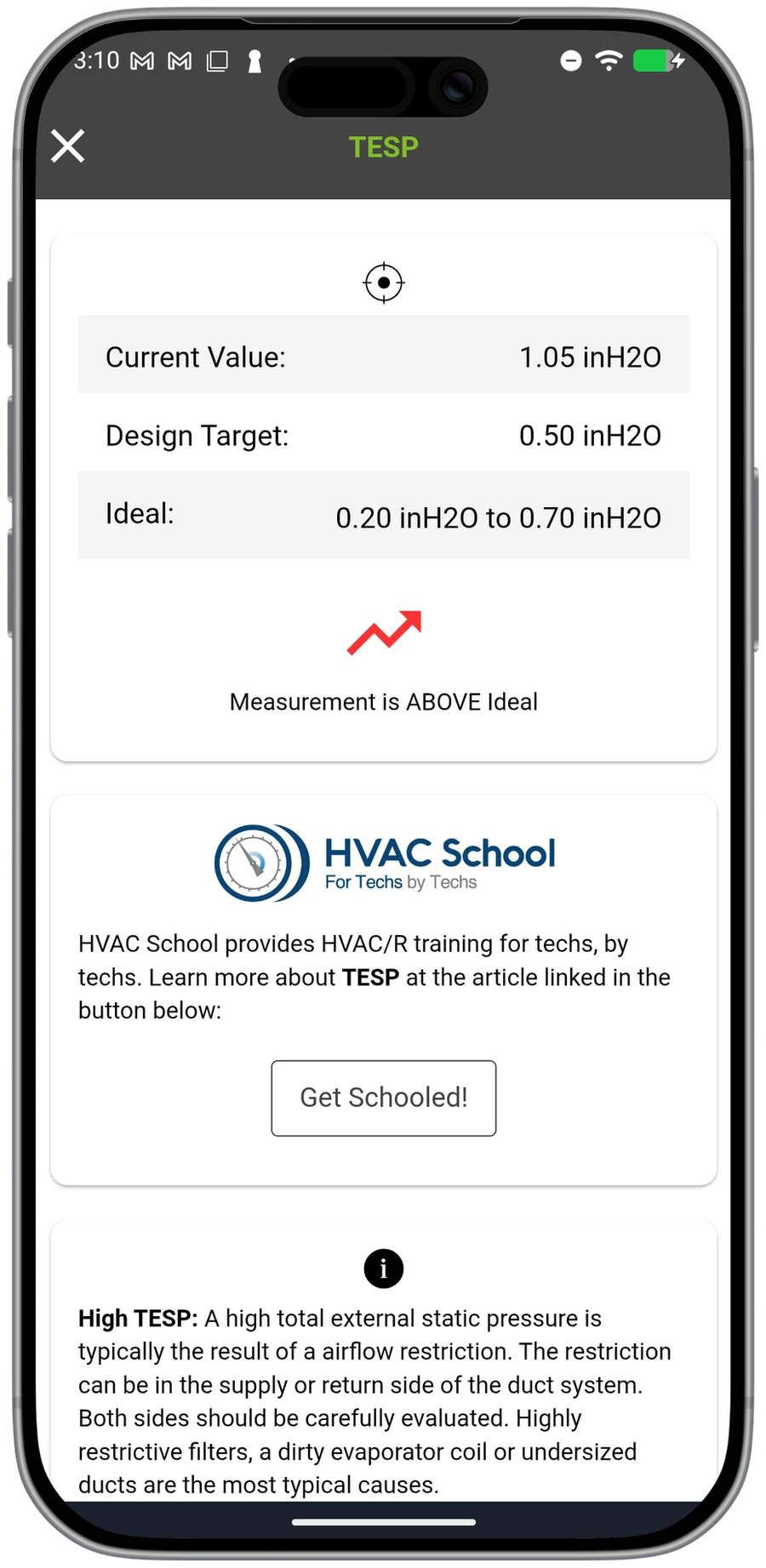
Measure total external static pressure across everything external to the air handler with static pressure tips. Then find the airflow on the manufacturer's fan table for that blower speed.
A fan table gives a range between two values, so this method tells you whether airflow is in the right range. It does not give a single measured number.
Three ways to run a traverse
Jim Bergmann walks through each method in a five-part video series. Parts 3 to 5 run the traverse itself.
Hot-wire anemometer
PremierA hot-wire anemometer such as the Testo 405i fits in a shirt pocket and reaches into the duct through small drilled holes. Mark the insertion depths on the probe shaft and slide the probe to the back of the duct. Tap Marked and Ready, and the app beeps you from point to point and from hole to hole.
Vane anemometer
PremierWith a vane anemometer such as the Testo 410i connected, the quick test switches to grille face velocity. Enter the width and height of the grille opening, measured inside the frame. Then enter the Ak factor, which accounts for the part of that opening the grille's vanes block. If you don't know the Ak factor, the app supplies a default.
Choose a point-by-point traverse or a timed sweep. In a timed sweep, the probe moves continuously across the grille in passes, and audio cues mark where the probe should be. A temperature and humidity probe in the return supplies the standard CFM calculation.
Pitot tube and manometer
PremierThe Testo 420's manometer comes off the capture hood. Set it to off-hood in the Toolbox, and it becomes the manometer for a pitot tube traverse. Open the quick test, and it sets itself up for an in-duct pitot tube and manometer.
A pitot tube reads total pressure at its tip and static pressure through the holes in its side. The difference is velocity pressure, which gives the speed of the air. You can also enter the duct location and a target airflow. A connected Testo 605i supplies the temperature and humidity readings for the density correction.
Tools that work with the traverse
measureQuick connects directly to the Testo 405i, 410i, 420, 416 and 425, and works with the TEC DG-8 and a pitot tube. The Testo 605i supplies temperature and humidity for the density correction.
| Tool | Role in the traverse |
|---|---|
| Testo 405i | In-duct hot-wire traverse through small test ports. |
| Testo 410i | Grille face-velocity traverse, with an Ak factor for the part of the opening the vanes block. |
| Testo 420 | As a capture hood, a direct CFM reading at the grille. In pressure-only mode, the manometer for a pitot tube traverse. |
| Testo 416 | Connects directly; measureQuick sets it up for an in-duct traverse. |
| Testo 425 | Connects directly for an in-duct traverse. |
| TEC DG-8 with a pitot tube | Pitot tube traverse. |
| Testo 605i | Temperature and humidity for the air density correction. |
One Testo 420 covers three methods: the hood, static pressure with the manometer, and a pitot tube traverse. Browse every supported instrument in Smart Tools.
Questions, answered
Is the Duct Airflow Traverse part of Premier Services?
Yes. The Duct Airflow Traverse is a quick test for Premier Services subscribers, and it is included with Premier Services.
Where do I start a traverse?
Open it from Quick Tests, or from the indoor airflow measurements. In mQ+, cooling workflows include a Duct Traverse step, and the traverse also runs in Test Mode with a full-screen 3D view.
Which tools work with it?
measureQuick connects directly to the Testo 405i (in-duct hot wire), 410i (grille face velocity, with an Ak factor), 420 (as a hood, or in pressure-only mode as the manometer for a pitot tube traverse), 416 and 425, and works with the TEC DG-8 and a pitot tube. The Testo 605i supplies temperature and humidity for the density correction.
How long does a traverse take?
In Jim's demo, each of the five access holes took about 20 seconds, and the full 25-point traverse took about two minutes. There is no time limit between holes, so you can stop and pick up where you left off.
What does the report show?
Traverse results print on their own report page: actual and standard CFM, average velocity, duct size, the heat map and velocity profile, the velocity and number of readings at each point, and the density correction.
What if the airflow in the duct is disturbed?
If the velocity profile is highly disturbed, the app says so and suggests measuring further down the duct.
How do I get it?
The update installs over the air. In the app, tap the user icon in the upper left and check for updates.
Put a measured number on airflow.
Real-time diagnostics on 80+ tools across 17+ brands are free forever. Premier is $49 per user per month.