
What's new in measureQuick.
measureQuick has added a lot this year, from System View and mQ+ in the app to the new mQ Cloud. Here is every update in one place, newest first.
App updates install over the air. In the app, tap the user icon in the upper left and check for updates. The About page shows the update's progress. The new mQ Cloud is at cloud.measurequick.com; sign in with the same email and password you use in the app.
Premier Services included with your subscription Free for every measureQuick user, Free plan included
October 27, 2026
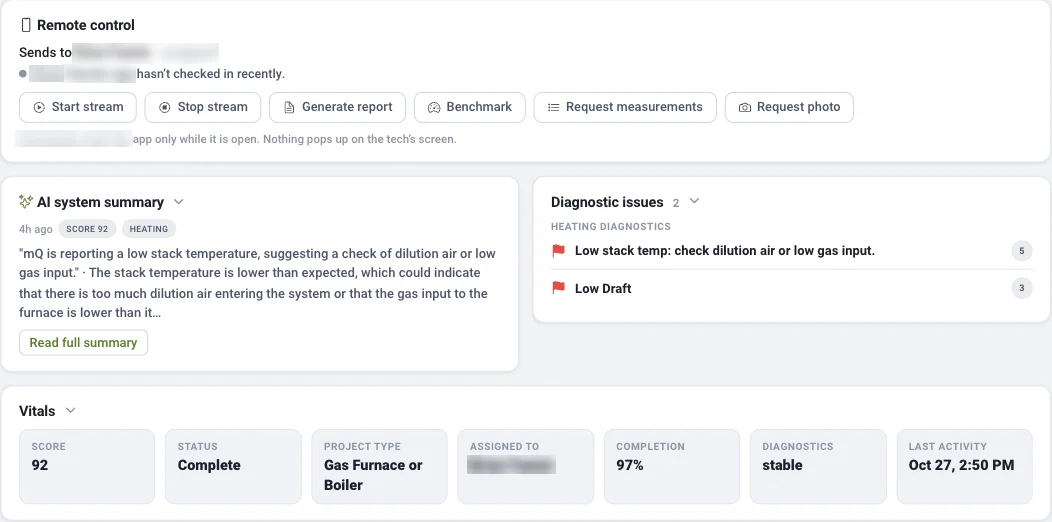
A new mQ Cloud at cloud.measurequick.com, with live jobs in TestTracker, customer records in Asset Manager, and self-service billing. The previous Cloud is still at classic.measurequick.com.
-
TestTracker
Watch a tech's gauges and readings live while they're on the job. Today's jobs, scores and CO alerts show on one screen, as a list or on a map.
TestTracker → -
Remote requests
Ask a tech for a photo or readings from your computer, and the request shows up in their app while it's open.
TestTracker → -
Job pages
Each job shows the Vitals score, an mQ Assist summary, the problems found, photos and the report. ServiceTitan links open straight to the right job.
The new mQ Cloud → -
Asset Manager
Every customer's sites, equipment, past jobs and reports in one place.
Asset Manager → -
Tool Tracker
See every connected tool, who has it, and when it's due for calibration.
Tool Tracker → -
Team and company setup
Add users, set roles, import a team from a spreadsheet, build your own checklists, and lock app settings for every tech.
Setting up the Cloud → -
App Store and billing
Connect ServiceTitan, Jobber and Housecall Pro. Pay by card or bank account, apply a promo code, and download invoices.
The App Store → -
Languages, themes and phones
Eight languages, light and dark mode, and a layout that works on a phone. The previous Cloud is still a click away at classic.measurequick.com.
The new mQ Cloud →
October 16, 2026
Calibration certificates in the Toolbox, a live View screen, and measured airflow in mQ+ cooling workflows.
-
Tool photos and calibration certificates
In the Toolbox, add a photo and a calibration certificate to each tool, and measureQuick reminds you when a calibration is due. Tags, filters and swipe actions keep a long tool list manageable.
The Toolbox → -
Live View screen
A live View screen shows live readings and trends for any probe, and measurement details now include a mini trend chart, so you can see how a reading has moved.
Release notes → -
Airflow steps in mQ+ cooling
Premier ServicesIn mQ+, cooling workflows now include TrueFlow and Duct Traverse steps, so measured airflow is part of the workflow. The Duct Airflow Traverse also runs in Test Mode, with a full-screen 3D view.
Duct Airflow Traverse → -
Testo 417 flow funnel
measureQuick accepts the Testo 417 vane anemometer with its flow funnel as a flow hood source for register airflow.
Smart Tools → -
Refrigerant scale, DL599 and HAC
Choose your refrigerant scale's units and tare it from the app. UEi DL599 and HAC readings can be captured on the heating electrical screen.
Smart Tools → -
Combustion Air calculator
The Combustion Air calculator has been overhauled.
Combustion analysis → -
Save to ServiceTitan in mQ+
Premier ServicesSave to ServiceTitan in mQ+ no longer skips the report.
ServiceTitan integration → -
Nearby Sites and maps
Nearby Sites can show all sites, not just the closest ones, and maps no longer zoom out to a world view.
Release notes →
October 2, 2026
A guided duct traverse, the Jobber integration, and changes to heating Vitals.
-
Duct Airflow Traverse
Premier ServicesA quick test for Premier Services. measureQuick lays out the measurement points, paces you through them with audio cues, and calculates airflow, with results on their own report page.
Duct Airflow Traverse → -
Jobber
Premier ServicesmeasureQuick now connects to Jobber, alongside ServiceTitan and Housecall Pro, with Premier Services. Job details come in from Jobber, and photos, PDF reports and ACCA QI certificates go back to the Jobber job.
Jobber integration → -
CO and heating Vitals
CO air-free no longer lowers the heating Vitals score. It shows as a four-level condition indicator, and dangerous CO still fails the test. Heating scores from before and after October 2, 2026 are calculated differently, so compare like with like.
HVAC Vitals™ → -
Letter grades
Letter grades use the standard scale everywhere: 90 A, 80 B, 70 C, 60 D.
HVAC Vitals™ → -
Combustion stability and multi-cell furnaces
A combustion stability indicator shows when readings have settled, and multi-cell furnaces are supported on the combustion page.
Combustion analysis → -
PDF attachments in reports
Premier ServicesAttach PDFs such as a Manual J or a duct leakage test in Photos, and measureQuick appends them to the report.
Documentation → -
mQ Assist
Premier ServicesLabel each AI System Profiler photo (furnace or air handler, condenser, coil, filter) for better equipment identification, and set a User Profile so mQ Assist tailors answers to your experience.
mQ Assist → -
Multiple Superheat
FreeThe Multiple Superheat test works with every probe brand, picks up where you left off, and shows trend charts.
Release notes → -
Two-stage compressor diagnostics
FreeSet a system as two-stage in the system profile, and measureQuick flags it when the second stage isn't engaging.
Release notes →
August 2026
Indoor fan power estimates and checklist updates.
-
Indoor fan power estimates
When blower watts can't be measured, measureQuick can estimate indoor fan power. Estimates are labeled as estimates and don't count toward Title 24 or ACCA compliance.
Release notes → -
Mandatory checklist items and spreadsheet import/export
Checklist items can be made mandatory, and checklists can be imported and exported as a spreadsheet.
Release notes → -
ServiceTitan upload retries
Pushes to ServiceTitan retry on their own, and any failure shows in the upload bar.
ServiceTitan integration →
June 2026
Gas quick tests, a redesigned leak test, and longer videos.
-
Gas Vent Sizer, Vent Termination Check and Gas Pipe Sizer
Premier ServicesWith Premier Services, Gas Vent Sizer, Vent Termination Check and Gas Pipe Sizer quick tests size and check the venting and gas piping on the job.
Release notes → -
Pressure (leak) Test
A redesigned Pressure (leak) Test.
Release notes → -
Videos up to 6 minutes
Premier ServicesPhoto & Video Documentation clips can run up to 6 minutes, checklist-item clips included.
Documentation → -
More tools and refrigerants
Support for the NAVAC NX1G, NST1 and NST2, and for R-454A and R-454C.
Smart Tools →
April 2026
The 3.6 release: System View, mQ+, and the Premier Services toolkit.
-
System View
Premier ServicesA live picture of the refrigerant cycle, drawn from your probes. Tap any component to read it.
System View → -
mQ+ interface
Premier ServicesA field-first interface. Premier Services companies choose mQ Classic or mQ+ as a company-wide setting.
mQ+ → -
Companywide Checklists
Premier ServicesBuild a checklist once and deploy it to every technician in the company.
Premier Services → -
Photo & Video Documentation
Premier ServicesCapture photos and video on the job, tied to the test record and the report.
Documentation → -
Tool Tracker
Premier ServicesSee every connected tool and its last-known location.
Tool Tracker → -
Sign-in, settings and camera
FreeSingle sign-on, refrigerant defaults to the last one used, dark and light themes, and the Rapid Fire camera.
Release notes → -
Testo 558s and 570s
Support for the Testo 558s and 570s.
Smart Tools →
Read more
Get the latest measureQuick.
Real-time diagnostics on 80+ tools across 17+ brands are free forever. Premier Services is $49 per user per month.